

Design & engineering
10 Ways an Agentic Chat Interface Can Break
The happy path is a conversation. The hard parts begin when the agent actually does something. Try ten small failures, and a better pattern for each.
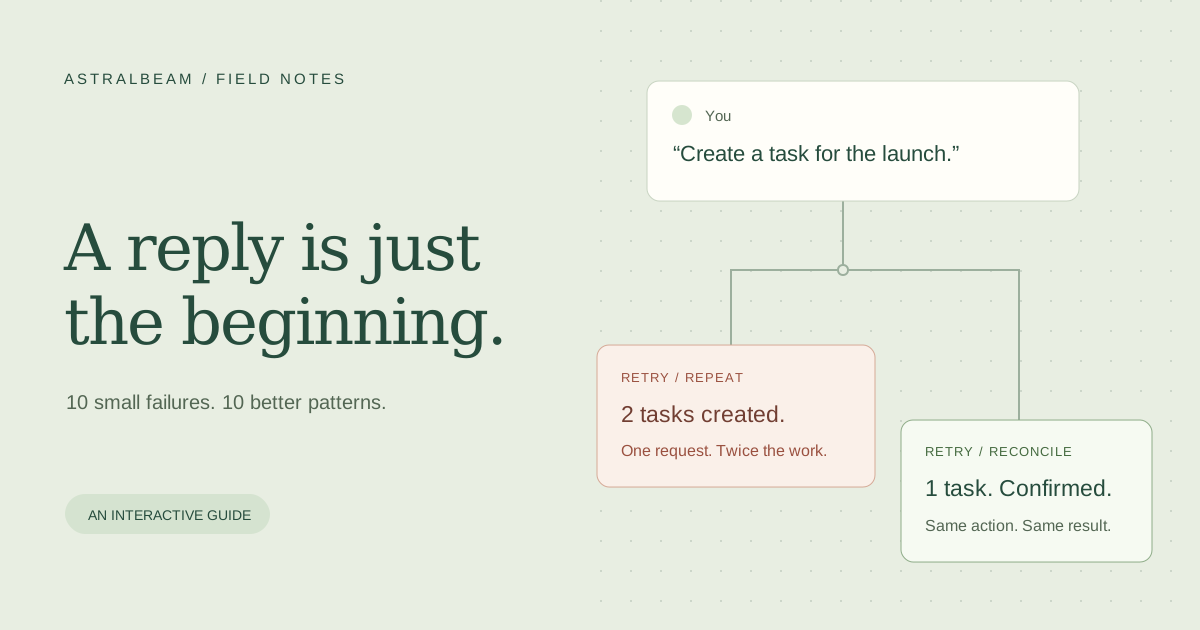
An agentic chat interface has more to do than display a reply. It must explain work in progress, ask for decisions, and keep an accurate record of what happened. A convincing answer is little comfort when the interface loses your draft or creates the same task twice.
Here are ten small failures worth trying before you ship. Each interactive example is an intentionally simplified simulation, not a recording of a particular product. Press Start to watch the failure, followed by a better pattern.
1. The spinner that explains nothing
“Thinking…” hides several different states: waiting for a model, fetching data, running a tool, or waiting for you. A long pause looks exactly like a dead connection. Show the current operation, elapsed time, and the next decision. Report facts from the execution state, not an invented percentage.
Press Start to watch the failure, then a better pattern.
2. A connection drop erases the answer
A phone changes networks halfway through a response. The partial answer vanishes, and reconnecting starts a fresh conversation. Preserve the conversation and message identities, keep received content visible, and reconnect to the existing run where supported. When resuming is impossible, say so and offer an explicit retry. Stream resumption requires persistence, not just another fetch.
Press Start to watch the failure, then a better pattern.
3. Retry performs the action twice
The server creates a task, but the acknowledgement never reaches the browser. “Try again” creates a second task. Distinguish retrying a response from repeating an action. Give each logical operation a stable identity and reconcile its result before replaying a write. Stripe's idempotency contract is a useful concrete example of making retries safe.
Press Start to watch the failure, then a better pattern.
4. Approval without enough information
“Allow this action?” asks for trust without explaining the consequence. A useful approval names the action, affected records, scope, and whether it can be undone. Bind that decision to the exact proposed operation. If the agent changes its plan, ask again. A confirmation card also does not replace server-side permission checks. See the AI SDK's tool approval flow.
Press Start to watch the failure, then a better pattern.
5. Stop only stops the text
The chat says “Stopped,” while a background tool keeps sending emails. Cancellation must reach the work, and the interface must distinguish a cancellation request from confirmed cancellation. Show what completed, what was cancelled, and what cannot be reversed. For external operations that cannot be stopped, say they are still running instead of promising that everything has stopped.
Press Start to watch the failure, then a better pattern.
6. “Done” hides a partial failure
A batch updates two projects and fails on the third. The final sentence celebrates success anyway. Render outcomes from tool results, with a status for each affected item and an honest overall summary. Keep completed work visible. Offer a retry for the failed part only when it is safe, or explain the permission or input change needed first.
Press Start to watch the failure, then a better pattern.
7. New messages steal your reading position
You scroll up to check a detail, and the next reply throws you to the bottom. Follow new content only while the reader is already near the end. Otherwise, preserve their position and offer a “new reply” control. In the example below, a reply arrives while you reread an earlier invoice. The better pattern lets you decide when to jump.
Here is where each open invoice stands:
Invoice 1042 is awaiting approval from Priya in finance.
Invoice 1043 was paid on Monday.
Invoice 1044 is due on Friday.
Invoice 1045 needs a purchase order.
Invoice 1046 is disputed by the customer.
Press Start to watch the failure, then a better pattern.
8. A failed send destroys the draft
You write a careful request. The composer clears immediately, then the network fails. Keep the draft until the server acknowledges it, or restore it on failure. Preserve attachment references too. If drafts survive navigation, scope them to the signed-in user and conversation so a shared device does not leak one person's text into another person's session.
Press Start to watch the failure, then a better pattern.
9. The desktop result does not fit a phone
The chat bubbles shrink, but a tool's table stays wide and its action disappears. Test the results inside the chat, not just the chat container. Reflow cards and controls, contain genuinely two-dimensional tables, and test with the on-screen keyboard and enlarged text. The WCAG reflow guidance explains why small viewports and zoom belong in the same conversation.
Press Start to watch the failure, then a better pattern.
10. The update is visible, but never announced
A report appears, yet a screen reader receives no indication that work finished. Announce meaningful state changes, preserve keyboard focus, and label controls by what they do. Do not announce every streamed token. The W3C guidance on status messages also warns against overly chatty updates. The example below visualizes the announcement so you can compare both states without audio.
Press Start to watch the failure, then a better pattern.
Building with AstralBeam
AstralBeam provides an embeddable agent sidebar with conversation history, file attachments, and tools that connect the agent to your app. It gives you a starting point for the chat experience while you define the product's actions and permission boundaries. Explore the documentation or the source to see how it fits your application.